关于TypeScript
2025-03-14 10:26:00 • 30min
一、提高开发效率的几个 TS 工具类型
一、类型别名
TypeScript 提供了为类型注解设置别名的便捷语法,可以使用 type SomeName = someValidTypeAnnotation 来创建别名,比如:
type Pet = "cat" | "dog";
let pet: Pet;

pet = "cat"; // Ok
pet = "dog"; // Ok
pet = "zebra"; // Compiler error
二、基础知识
先介绍一下相关的一些基础知识。
2.1 typeof
在 TypeScript 中,typeof 操作符可以用来获取一个变量声明或对象的类型。
interface Person {
  name: string;
  age: number;
}

const sem: Person = { name: "semlinker", age: 30 };
type Sem = typeof sem; // type Sem = Person
在上面代码中,我们通过 typeof 操作符获取 sem 变量的类型并赋值给 Sem 类型变量,之后我们就可以使用 Sem 类型:
const lolo: Sem = { name: "lolo", age: 5 };此外,typeof 操作符除了可以获取对象的结构类型之外,它也可以用来获取函数对象的类型,比如:
function toArray(x: number): Array<number> {
  return [x];
}

type Func = typeof toArray; // -> (x: number) => number[]
2.2 keyof
TypeScript 允许我们遍历某种类型的属性,并通过 keyof 操作符提取其属性的名称。keyof 操作符是在 TypeScript 2.1 版本引入的,该操作符可以用于获取某种类型的所有键,其返回类型是联合类型。
interface Person {
  name: string;
  age: number;
}

type K1 = keyof Person; // "name" | "age"
type K2 = keyof Person[]; // "length" | "toString" | "pop" | "push" | "concat" | "join"
type K3 = keyof { [x: string]: Person }; // string | number
typeof 和 keyof 结合在一起使用
const COLORS = {
  red: "red",
  blue: "blue",
};

// 首先通过typeof操作符获取Colors变量的类型,然后通过keyof操作符获取该类型的所有键,
// 即字符串字面量联合类型 'red' | 'blue'
type Colors = keyof typeof COLORS;
let color: Colors;
color = "red"; // Ok
color = "blue"; // Ok

// Type '"yellow"' is not assignable to type '"red" | "blue"'.
color = "yellow"; // Error
2.3 in
in 用来遍历枚举类型:
type Keys = "a" | "b" | "c";

type Obj = {
  [p in Keys]: any;
}; // -> { a: any, b: any, c: any }
2.4 infer
在条件类型语句中,可以用 infer 声明一个类型变量并且对它进行使用。
type ReturnType<T> = T extends (...args: any[]) => infer R ? R : any;以上代码中 infer R 就是声明一个变量来承载传入函数签名的返回值类型,简单说就是用它取到函数返回值的类型方便之后使用。
2.5 extends
有时候我们定义的泛型不想过于灵活或者说想继承某些类等,可以通过 extends 关键字添加泛型约束。
条件类型会以一个条件表达式进行类型关系检测,从而在两种类型中选择其一:
例如:
interface ILengthwise {
  length: number;
}

function loggingIdentity<T extends ILengthwise>(arg: T): T {
  console.log(arg.length);
  return arg;
}
现在这个泛型函数被定义了约束,因此它不再是适用于任意类型:
loggingIdentity(3); // Error, number doesn't have a .length property这时我们需要传入符合约束类型的值,必须包含必须的属性:
loggingIdentity({ length: 10, value: 3 });三、内置类型别名
3.1 Partial
Partial<T> 的作用就是将某个类型里的属性全部变为可选项 ?。
定义:
/**
 * Make all properties in T optional
 */
type Partial<T> = {
  [P in keyof T]?: T[P];
};
在以上代码中,首先通过 keyof T 拿到 T 的所有属性名,然后使用 in 进行遍历,将值赋给 P,最后通过 T[P] 取得相应的属性值。中间的 ?,用于将所有属性变为可选。
示例:
interface Todo {
  title: string;
  description: string;
}

function updateTodo(todo: Todo, fieldsToUpdate: Partial<Todo>) {
  return { ...todo, ...fieldsToUpdate };
}

const todo1 = {
  title: "organize desk",
  description: "clear clutter",
};

const todo2 = updateTodo(todo1, {
  description: "throw out trash",
});
3.2 Required
Required<T> 的作用就是将某个类型里的属性全部变为必选项。
定义:
// node_modules/typescript/lib/lib.es5.d.ts

/**
 * Make all properties in T required
 */
type Required<T> = {
  [P in keyof T]-?: T[P];
};以上代码中,-? 的作用就是移除可选项 ?。
示例:
interface Props {
  a?: number;
  b?: string;
}

const obj: Props = { a: 5 }; // OK
const obj2: Required<Props> = { a: 5 }; // Error: property 'b' missing
3.3 Readonly
Readonly<T> 的作用是将某个类型所有属性变为只读属性,也就意味着这些属性不能被重新赋值。
定义:
// node_modules/typescript/lib/lib.es5.d.ts

/**
 * Make all properties in T readonly
 */
type Readonly<T> = {
  readonly [P in keyof T]: T[P];
};
如果将上面的 readonly 改成 -readonly, 就是移除子属性的 readonly 标识。
示例:
interface Todo {
  title: string;
}

const todo: Readonly<Todo> = {
  title: "Delete inactive users",
};

todo.title = "Hello"; // Error: cannot reassign a readonly property
Readonly<T> 对于表示在运行时将赋值失败的表达式很有用(比如,当尝试重新赋值冻结对象的属性时)。
function freeze<T>(obj: T): Readonly<T>;3.4 Record
Record<K, T> 的作用是构造一个对象类型,它所有的 key 的类型是 K,value 的类型是 T。 Record<K extends keyof any, T> 的作用是将 K 中所有的属性的值转化为 T 类型。
定义:
// node_modules/typescript/lib/lib.es5.d.ts

/**
 * Construct a type with a set of properties K of type T
 */
type Record<K extends keyof any, T> = {
  [P in K]: T;
};
示例:
interface CatInfo {
  age: number;
  breed: string;
}
type CatName = "miffy" | "boris" | "mordred";

const cats: Record<CatName, CatInfo> = {
  miffy: { age: 10, breed: "Persian" },
  boris: { age: 5, breed: "Maine Coon" },
  mordred: { age: 16, breed: "British Shorthair" },
};
3.5 Pick
Pick<T, K extends keyof T> 的作用是将某个类型中的子属性挑出来,变成包含这个类型部分属性的子类型。
定义:
/**
 * From T, pick a set of properties whose keys are in the union K
 */
type Pick<T, K extends keyof T> = {
  [P in K]: T[P];
};
示例:
interface Todo {
  title: string;
  description: string;
  completed: boolean;
}

type TodoPreview = Pick<Todo, "title" | "completed">;

const todo: TodoPreview = {
  title: "Clean room",
  completed: false,
};
3.6 Exclude
Exclude<T, U> 的作用是将某个类型中属于另一个的类型移除掉。
定义:
/**
 * Exclude from T those types that are assignable to U
 */
type Exclude<T, U> = T extends U ? never : T;
示例:
type T0 = Exclude<"a" | "b" | "c", "a">; // "b" | "c"
type T1 = Exclude<"a" | "b" | "c", "a" | "b">; // "c"
type T2 = Exclude<string | number | (() => void), Function>; // string | number
3.7 Extract
Extract<T, U> 的作用是从 T 中提取出 U。
定义:
/**
 * Extract from T those types that are assignable to U
 */
type Extract<T, U> = T extends U ? T : never;
如果 T 能赋值给 U 类型的话,那么就会返回 T 类型,否则返回 never 类型。
示例:
type T0 = Extract<"a" | "b" | "c", "a" | "f">; // "a"
type T1 = Extract<string | number | (() => void), Function>; // () =>void
3.8 Omit
Omit<T, K extends keyof any> 的作用是使用 T 类型中除了 K 类型的所有属性,来构造一个新的类型。
定义:
/**
 * Construct a type with the properties of T except for those in type K.
 */
type Omit<T, K extends keyof any> = Pick<T, Exclude<keyof T, K>>;
示例:
interface Todo {
  title: string;
  description: string;
  completed: boolean;
}

type TodoPreview = Omit<Todo, "description">;

const todo: TodoPreview = {
  title: "Clean room",
  completed: false,
};
3.9 NonNullable
NonNullable<T> 的作用是用来过滤类型中的 null 及 undefined类型。
定义:
/**
 * Exclude null and undefined from T
 */
type NonNullable<T> = T extendsnull | undefined ? never : T;
示例:
type T0 = NonNullable<string | number | undefined>; // string | number
type T1 = NonNullable<string[] | null | undefined>; // string[]
3.10 ReturnType
ReturnType<T> 的作用是用于获取函数 T 的返回类型。
定义:
/**
 * Obtain the return type of a function type
 */
type ReturnType<T extends (...args: any) => any> = T extends (
  ...args: any
) => infer R
  ? R
  : any;
示例:
type T0 = ReturnType<() =>string>; // string
type T1 = ReturnType<(s: string) =>void>; // void
type T2 = ReturnType<<T>() => T>; // {}
type T3 = ReturnType<<T extends U, U extendsnumber[]>() => T>; // number[]
type T4 = ReturnType<any>; // any
type T5 = ReturnType<never>; // any
type T6 = ReturnType<string>; // Error
type T7 = ReturnType<Function>; // Error
3.11 InstanceType
InstanceType 的作用是获取构造函数类型的实例类型。
定义
/**
 * Obtain the return type of a constructor function type
 */
type InstanceType<T extendsnew (...args: any) => any> = T extendsnew (...args: any) => infer R ? R : any;
示例:
class C {
  x = 0;
  y = 0;
}

type T0 = InstanceType<typeof C>; // C
type T1 = InstanceType<any>; // any
type T2 = InstanceType<never>; // any
type T3 = InstanceType<string>; // Error
type T4 = InstanceType<Function>; // Error
3.12 ThisType
ThisType<T> 的作用是用于指定上下文对象的类型。
定义:
/**
 * Marker for contextual 'this' type
 */
interface ThisType<T> {}
注意:使用 ThisType<T> 时,必须确保 --noImplicitThis 标志设置为 true。
示例:
interface Person {
  name: string;
  age: number;
}

const obj: ThisType<Person> = {
  dosth() {
    this.name; // string
  },
};
3.13 Parameters
Parameters<T> 的作用是用于获得函数的参数类型组成的元组类型。
定义:
// node_modules/typescript/lib/lib.es5.d.ts

/**
 * Obtain the parameters of a function type in a tuple
 */
type Parameters<T extends (...args: any) => any> = T extends (
  ...args: infer P
) => any
  ? P
  : never;
示例:
type A = Parameters<() => void>; // []
type B = Parameters<typeofArray.isArray>; // [any]
type C = Parameters<typeofparseInt>; // [string, (number | undefined)?]
type D = Parameters<typeofMath.max>; // number[]
3.14 ConstructorParameters
ConstructorParameters<T> 的作用是提取构造函数类型的所有参数类型。它会生成具有所有参数类型的元组类型(如果 T 不是函数,则返回的是 never 类型)。
定义:
// node_modules/typescript/lib/lib.es5.d.ts

/**
 * Obtain the parameters of a constructor function type in a tuple
 */
type ConstructorParameters<T extendsnew (...args: any) => any> = T extendsnew (...args: infer P) => any ? P : never;
示例:
type A = ConstructorParameters<ErrorConstructor>; // [(string | undefined)?]
type B = ConstructorParameters<FunctionConstructor>; // string[]
type C = ConstructorParameters<RegExpConstructor>; // [string, (string | undefined)?]
二、编写高效 TS 代码的一些建议
1、尽量减少重复代码
对于刚接触 TypeScript 的小伙伴来说,在定义接口时,可能一不小心会出现以下类似的重复代码。比如:
interface Person {
  firstName: string;
  lastName: string;
}

interface PersonWithBirthDate {
  firstName: string;
  lastName: string;
  birth: Date;
}
很明显,相对于 Person 接口来说,PersonWithBirthDate 接口只是多了一个 birth 属性,其他的属性跟 Person 接口是一样的。那么如何避免出现例子中的重复代码呢?要解决这个问题,可以利用 extends 关键字:
interface Person {
  firstName: string;
  lastName: string;
}

interface PersonWithBirthDate extends Person {
  birth: Date;
}
当然除了使用 extends 关键字之外,也可以使用交叉运算符(&):
type PersonWithBirthDate = Person & { birth: Date };另外,有时候你可能还会发现自己想要定义一个类型来匹配一个初始配置对象的「类型」,比如:
const INIT_OPTIONS = {
  width: 640,
  height: 480,
  color: "#00FF00",
  label: "VGA",
};

interface Options {
  width: number;
  height: number;
  color: string;
  label: string;
}
其实,对于 Options 接口来说,你也可以使用 typeof 操作符来快速获取配置对象的「类型」:
type Options = typeof INIT_OPTIONS;而在使用可辨识联合(代数数据类型或标签联合类型)的过程中,也可能出现重复代码。比如:
interface SaveAction {
  type: "save";
  // ...
}

interface LoadAction {
  type: "load";
  // ...
}

type Action = SaveAction | LoadAction;
type ActionType = "save" | "load"; // Repeated types!
为了避免重复定义 save 和 load,我们可以使用成员访问语法,来提取对象中属性的类型:
type ActionType = Action["type"]; // 类型是 "save" | "load"然而在实际的开发过程中,重复的类型并不总是那么容易被发现。有时它们会被语法所掩盖。比如有多个函数拥有相同的类型签名:
type Options = object;
function get(url: string, opts: Options): Promise<Response> {
  return new Promise((resolve, reject) => {});
}
function post(url: string, opts: Options): Promise<Response> {
  return new Promise((resolve, reject) => {});
}type Options = object;
type HTTPFunction = (url: string, opts: Options) => Promise<Response>;
const get: HTTPFunction = (url, opts) => {
return new Promise((resolve, reject) => {});
};
const post: HTTPFunction = (url, opts) => {
return new Promise((resolve, reject) => {});
};2、使用更精确的类型替代字符串类型
假设你正在构建一个音乐集,并希望为专辑定义一个类型。这时你可以使用 interface 关键字来定义一个 Album 类型:
interface Album {
  artist: string; // 艺术家
  title: string; // 专辑标题
  releaseDate: string; // 发行日期:YYYY-MM-DD
  recordingType: string; // 录制类型:"live" 或 "studio"
}
对于 Album 类型,你希望 releaseDate 属性值的格式为 YYYY-MM-DD,而 recordingType 属性值的范围为 live 或 studio。但因为接口中 releaseDate 和 recordingType 属性的类型都是字符串,所以在使用 Album 接口时,可能会出现以下问题:
const dangerous: Album = {
  artist: "Michael Jackson",
  title: "Dangerous",
  releaseDate: "November 31, 1991", // 与预期格式不匹配
  recordingType: "Studio", // 与预期格式不匹配
};
虽然 releaseDate 和 recordingType 的值与预期的格式不匹配,但此时 TypeScript 编译器并不能发现该问题。为了解决这个问题,你应该为 releaseDate 和 recordingType 属性定义更精确的类型,比如这样:
interface Album {
  artist: string; // 艺术家
  title: string; // 专辑标题
  releaseDate: Date; // 发行日期:YYYY-MM-DD
  recordingType: "studio" | "live"; // 录制类型:"live" 或 "studio"
}
重新定义 Album 接口之后,对于前面的赋值语句,TypeScript 编译器就会提示以下异常信息:
const dangerous: Album = {
  artist: "Michael Jackson",
  title: "Dangerous",
  // 不能将类型“string”分配给类型“Date”。ts(2322)
  releaseDate: "November 31, 1991", // Error
  // 不能将类型“"Studio"”分配给类型“"studio" | "live"”。ts(2322)
  recordingType: "Studio", // Error
};
为了解决上面的问题,你需要为 releaseDate 和 recordingType 属性设置正确的类型,比如这样:
const dangerous: Album = {
  artist: "Michael Jackson",
  title: "Dangerous",
  releaseDate: new Date("1991-11-31"),
  recordingType: "studio",
};
另一个错误使用字符串类型的场景是设置函数的参数类型。假设你需要写一个函数,用于从一个对象数组中抽取某个属性的值并保存到数组中;
function pluck(record: any[], key: string): any[] {
  return record.map((r) => r[key]);
}
对于以上的 pluck 函数并不是很好,因为它使用了 any 类型,特别是作为返回值的类型。那么如何优化 pluck 函数呢?首先,可以通过引入一个泛型参数来改善类型签名:
function pluck<T>(record: T[], key: string): any[] {
  // 元素隐式具有 "any" 类型,因为类型为 "string" 的表达式不能用于索引类型 "unknown"。
  // 在类型 "unknown" 上找不到具有类型为 "string" 的参数的索引签名。ts(7053)
  return record.map((r) => r[key]); // Error
}
通过以上的异常信息,可知字符串类型的 key 不能被作为 unknown 类型的索引类型。要从对象上获取某个属性的值,你需要保证参数 key 是对象中的属性。
function pluck<T>(record: T[], key: keyof T) {
  return record.map((r) => r[key]);
}
对于更新后的 pluck 函数,你的 IDE 将会为你自动推断出该函数的返回类型:
function pluck<T>(record: T[], key: keyof T): T[keyof T][];于更新后的 pluck 函数,你可以使用前面定义的 Album 类型来测试一下:
const albums: Album[] = [
  {
    artist: "Michael Jackson",
    title: "Dangerous",
    releaseDate: new Date("1991-11-31"),
    recordingType: "studio",
  },
];

// let releaseDateArr: (string | Date)[]
const releaseDateArr = pluck(albums, "releaseDate");
示例中的 releaseDateArr 变量,它的类型被推断为 (string | Date)[],很明显这并不是你所期望的,它的正确类型应该是 Date[]。那么应该如何解决该问题呢?这时你需要引入第二个泛型参数 K,然后使用 extends 来进行约束:
function pluck<T, K extends keyof T>(record: T[], key: K): T[K][] {
  return record.map((r) => r[key]);
}

// let releaseDateArr: Date[]
const releaseDateArr = pluck(albums, "releaseDate");
3、选择条件类型而不是重载声明
假设你要使用 TS 实现一个 double 函数,该函数支持 string 或 number 类型。这时,你可能已经想到了使用联合类型和函数重载:
function double(x: number | string): number | string;
function double(x: any) {
  return x + x;
}
虽然这个 double 函数的声明是正确的,但它有一点不精确:
// const num: string | number
const num = double(10);
// const str: string | number
const str = double("ts");
对于 double 函数,你期望传入的参数类型是 number 类型,其返回值的类型也是 number 类型。当你传入的参数类型是 string 类型,其返回的类型也是 string 类型。而上面的 double 函数却是返回了 string | number 类型。为了实现上述的要求,你可能想到了引入泛型变量和泛型约束:
function double<T extends number | string>(x: T): T;
function double(x: any) {
  return x + x;
}
在上面的 double 函数中,引入了泛型变量 T,同时使用 extends约束了其类型范围。
// const num: 10
const num = double(10);
// const str: "ts"
const str = double("ts");
console.log(str);不幸的是,我们对精确度的追求超过了预期。现在的类型有点太精确了。当传递一个字符串类型时,double 声明将返回一个字符串类型,这是正确的。但是当传递一个字符串字面量类型时,返回的类型是相同的字符串字面量类型。这是错误的,因为 ts 经过 double 函数处理后,返回的是 tsts,而不是 ts。
另一种方案是提供多种类型声明。虽然 TypeScript 只允许你编写一个具体的实现,但它允许你编写任意数量的类型声明。你可以使用函数重载来改善 double 的类型:
function double(x: number): number;
function double(x: string): string;
function double(x: any) {
  return x + x;
}

// const num: number
const num = double(10);
// const str: string
const str = double("ts");
很明显此时 num 和 str 变量的类型都是正确的,但不幸的是,double 函数还有一个小问题。因为 double 函数的声明只支持 string 或 number类型的值,而不支持 string | number 联合类型,比如:
function doubleFn(x: number | string) {
  // 没有与此调用匹配的重载。
  // 第 1 个重载(共 2 个),“(x: number): number”,出现以下错误。
  //   类型“string | number”的参数不能赋给类型“number”的参数。
  //     不能将类型“string”分配给类型“number”。
  // 第 2 个重载(共 2 个),“(x: string): string”,出现以下错误。
  //   类型“string | number”的参数不能赋给类型“string”的参数。
  //     不能将类型“number”分配给类型“string”。ts(2769)
  return double(x); // Error
}
为什么会提示以上的错误呢?因为当 TypeScript 编译器处理函数重载时,它会查找重载列表,直到找一个匹配的签名。对于 number | string 联合类型,很明显是匹配失败的。
然而对于上述的问题,虽然可以通过新增 string | number 的重载签名来解决,但最好的方案是使用条件类型。在类型空间中,条件类型就像 if 语句一样:
function double<T extends number | string>(
  x: T
): T extends string ? string : number;
function double(x: any) {
  return x + x;
}
这与前面引入泛型版本的 double 函数声明类似,只是它引入更复杂的返回类型。条件类型使用起来很简单,与 JavaScript 中的三目运算符(?:)一样的规则。T extends string ? string : number 的意思是,如果 T 类型是 string 类型的子集,则 double 函数的返回值类型为 string 类型,否则为 number 类型。
在引入条件类型之后,前面的所有例子就可以正常工作了:
// const num: number
const num = double(10);
// const str: string
const str = double("ts");

// function f(x: string | number): string | number
function f(x: number | string) {
  return double(x);
}
4、一次性创建对象
const pt = {};
pt.x = 3;
pt.y = 4;
然而对于同样的代码,在 TypeScript 中会提示以下错误信息:
const pt = {};
// Property 'x' does not exist on type '{}'
pt.x = 3; // Error
// Property 'y' does not exist on type '{}'
pt.y = 4; // Error
这是因为第一行中 pt 变量的类型是根据它的值 {} 推断出来的,你只能对已知的属性赋值。针对这个问题,你可能会想到一种解决方案,即新声明一个 Point 类型,然后把它作为 pt 变量的类型:
interface Point {
  x: number;
  y: number;
}

// Type '{}' is missing the following properties from type 'Point': x, y(2739)
const pt: Point = {}; // Error
pt.x = 3;
pt.y = 4;
那么如何解决上述问题呢?其中一种最简单的解决方案是一次性创建对象:
const pt = {
  x: 3,
  y: 4,
}; // OK如果你想一步一步地创建对象,你可以使用类型断言(as)来消除类型检查:
const pt = {} as Point;
pt.x = 3;
pt.y = 4; // OK
但是更好的方法是一次性创建对象并显式声明变量的类型:
const pt: Point = {
  x: 3,
  y: 4,
};
而当你需要从较小的对象来构建一个较大的对象时,你可能会这样处理,比如:
const pt = { x: 3, y: 4 };
const id = { name: "Jerry" };
const namedPoint = {};
Object.assign(namedPoint, pt, id);

// 类型“{}”上不存在属性“name”。 ts(2339)
namedPoint.name; // Error
为了解决上述问题,你可以使用对象展开运算符 ... 来一次性构建大的对象:
const namedPoint = { ...pt, ...id };
namedPoint.name; // OK, type is string
此外,你还可以使用对象展开运算符,以一种类型安全的方式逐个字段地构建对象。关键是在每次更新时使用一个新变量,这样每个变量都会得到一个新类型:
const pt0 = {};
const pt1 = { ...pt0, x: 3 };
const pt: Point = { ...pt1, y: 4 }; // OK
虽然这是构建这样一个简单对象的一种迂回方式,但对于向对象添加属性并允许 TypeScript 推断新类型来说,这可能是一种有用的技术。要以类型安全的方式有条件地添加属性,可以使用带 null 或 {} 的对象展开运算符,它不会添加任何属性:
declare let hasMiddle: boolean;
const firstLast = { first: "Harry", last: "Truman" };
const president = { ...firstLast, ...(hasMiddle ? { middle: "S" } : {}) };
如果在编辑器中鼠标移到 president,你将看到 TypeScript 推断出的类型:
const president: {
  middle?: string;
  first: string;
  last: string;
};
最终通过设置 hasMiddle 变量的值,你就可以控制 president 对象中 middle 属性的值:
declare const hasMiddle: boolean;
const hasMiddle = true;
const firstLast = { first: "Harry", last: "Truman" };
const president = { ...firstLast, ...(hasMiddle ? { middle: "S" } : {}) };

const mid = president.middle;
console.log(mid); // S
三、被困扰过的 TS 问题
1、如何在 window 对象上显式设置属性
对于使用过 JavaScript 的开发者来说,对于 window.MyNamespace = window.MyNamespace || {}; 这行代码并不会陌生。为了避免开发过程中出现冲突,我们一般会为某些功能设置独立的命名空间。
然而,在 TS 中对于 window.MyNamespace = window.MyNamespace || {}; 这行代码,TS 编译器会提示以下异常信息:
类型“Window & typeof globalThis”上不存在属性“MyNamespace”。ts(2339)
以上异常信息是说在 Window & typeof globalThis 交叉类型上不存在 MyNamespace 属性。那么如何解决这个问题呢?最简单的方式就是使用类型断言:
(window as any).MyNamespace = {};虽然使用 any 大法可以解决上述问题,但更好的方式是扩展 lib.dom.d.ts 文件中的 Window 接口来解决上述问题,具体方式如下:
declare interface Window {
  MyNamespace: any;
}

window.MyNamespace = window.MyNamespace || {};
下面我们再来看一下 lib.dom.d.ts 文件中声明的 Window 接口:
/**
 * A window containing a DOM document; the document property
 * points to the DOM document loaded in that window.
 */
interface Window
  extends
    EventTarget,
    AnimationFrameProvider,
    GlobalEventHandlers,
    WindowEventHandlers,
    WindowLocalStorage,
    WindowOrWorkerGlobalScope,
    WindowSessionStorage {
  // 已省略大部分内容
  readonly devicePixelRatio: number;
  readonly document: Document;
  readonly top: Window;
  readonly window: Window & typeof globalThis;
  addEventListener: (
    type: string,
    listener: EventListenerOrEventListenerObject,
    options?: boolean | AddEventListenerOptions
  ) => void;
  removeEventListener: <K extends keyof WindowEventMap>(
    type: K,
    listener: (this: Window, ev: WindowEventMap[K]) => any,
    options?: boolean | EventListenerOptions
  ) => void;
  [index: number]: Window;
}
在上面我们声明了两个相同名称的 Window 接口,这时并不会造成冲突。TypeScript 会自动进行接口合并,即把双方的成员放到一个同名的接口中。
2、如何为对象动态分配属性
在 JavaScript 中,我们可以很容易地为对象动态分配属性,比如:
const developer = {};
developer.name = "Tom";
以上代码在 JavaScript 中可以正常运行,但在 TypeScript 中,编译器会提示以下异常信息:
// 类型“{}”上不存在属性“name”。ts(2339){} 类型表示一个没有包含成员的对象,所以该类型没有包含 name 属性。为了解决这个问题,我们可以声明一个 LooseObject 类型:
interface LooseObject {
  [key: string]: any;
}
该类型使用 索引签名 的形式描述 LooseObject 类型可以接受 key 类型是字符串,值的类型是 any 类型的字段。有了 LooseObject 类型之后,我们就可以通过以下方式来解决上述问题:
interface LooseObject {
  [key: string]: any;
}

const developer: LooseObject = {};
developer.name = "Tom";
对于 LooseObject 类型来说,它的约束是很宽松的。在一些应用场景中,我们除了希望能支持动态的属性之外,也希望能够声明一些必选和可选的属性。
比如对于一个表示开发者的 Developer 接口来说,我们希望它的 name 属性是必填,而 age 属性是可选的,此外还支持动态地设置字符串类型的属性。针对这个需求我们可以这样做:
interface Developer {
  name: string;
  age?: number;
  [key: string]: any;
}

const developer: Developer = { name: "Tom" };
developer.age = 30;
developer.city = "Hangzhou";
3、如何理解函数重载的作用
5.1 可爱又可恨的联合类型
由于 JavaScript 是一个动态语言,我们通常会使用不同类型的参数来调用同一个函数,该函数会根据不同的参数而返回不同的类型的调用结果:
function add(x, y) {
  return x + y;
}

add(1, 2); // 3
add("1", "2"); // "12"
由于 TypeScript 是 JavaScript 的超集,因此以上的代码可以直接在 TypeScript 中使用,但当 TypeScript 编译器开启 noImplicitAny的配置项时,以上代码会提示以下错误信息:
2
// 参数“x”隐式具有“any”类型。ts(7006)
// 参数“y”隐式具有“any”类型。ts(7006)
该信息告诉我们参数 x 和参数 y 隐式具有 any 类型。为了解决这个问题,我们可以为参数设置一个类型。因为我们希望 add 函数同时支持 string 和 number 类型,因此我们可以定义一个 string | number 联合类型,同时我们为该联合类型取个别名:
type Combinable = string | number;在定义完 Combinable 联合类型后,我们来更新一下 add 函数:
function add(a: Combinable, b: Combinable) {
  if (typeof a === "string" || typeof b === "string") {
    return a.toString() + b.toString();
  }
  return a + b;
}
为 add 函数的参数显式设置类型之后,之前错误的提示消息就消失了。那么此时的 add 函数就完美了么,我们来实际测试一下:
const result = add("cat", "mouse");
result.split(" ");
在上面代码中,我们分别使用 cat 和 mouse 这两个字符串作为参数调用 add 函数,并把调用结果保存到一个名为 result 的变量上,这时候我们想当然的认为此时 result 的变量的类型为 string,所以我们就可以正常调用字符串对象上的 split 方法。但这时 TypeScript 编译器又出现以下错误信息了:
// 类型“string | number”上不存在属性“split”。
// 类型“number”上不存在属性“split”。ts(2339)
很明显 Combinable 和 number 类型的对象上并不存在 split 属性。问题又来了,那如何解决呢?这时我们就可以利用 TypeScript 提供的函数重载。
5.2 函数重载
函数重载或方法重载是使用相同名称和不同参数数量或类型创建多个方法的一种能力。
function add(a: number, b: number): number;
function add(a: string, b: string): string;
function add(a: string, b: number): string;
function add(a: number, b: string): string;
function add(a: Combinable, b: Combinable) {
  // type Combinable = string | number;
  if (typeof a === "string" || typeof b === "string") {
    return a.toString() + b.toString();
  }
  return a + b;
}
在以上代码中,我们为 add 函数提供了多个函数类型定义,从而实现函数的重载。在 TypeScript 中除了可以重载普通函数之外,我们还可以重载类中的成员方法。
方法重载是指在同一个类中方法同名,参数不同(参数类型不同、参数个数不同或参数个数相同时参数的先后顺序不同),调用时根据实参的形式,选择与它匹配的方法执行操作的一种技术。所以类中成员方法满足重载的条件是:在同一个类中,方法名相同且参数列表不同。下面我们来举一个成员方法重载的例子:
class Calculator {
  add(a: number, b: number): number;
  add(a: string, b: string): string;
  add(a: string, b: number): string;
  add(a: number, b: string): string;
  add(a: Combinable, b: Combinable) {
    if (typeof a === "string" || typeof b === "string") {
      return a.toString() + b.toString();
    }
    return a + b;
  }
}

const calculator = new Calculator();
const result = calculator.add("cat", "mouse");
这里需要注意的是,当 TypeScript 编译器处理函数重载时,它会查找重载列表,尝试使用第一个重载定义。 如果匹配的话就使用这个。 因此,在定义重载的时候,一定要把最精确的定义放在最前面。另外在 Calculator 类中,add(a: Combinable, b: Combinable){ } 并不是重载列表的一部分,因此对于 add 成员方法来说,我们只定义了四个重载方法。
4、数字枚举与字符串枚举之间有什么区别
8.1 数字枚举
在 JavaScript 中布尔类型的变量含有有限范围的值,即 true 和 false。而在 TypeScript 中利用枚举,你也可以自定义相似的类型:
enum NoYes {
  No,
  Yes,
}
No 和 Yes 被称为枚举 NoYes 的成员。每个枚举成员都有一个 name 和一个 value。数字枚举成员值的默认类型是 number 类型。也就是说,每个成员的值都是一个数字:
enum NoYes {
  No, // 0
  Yes, // 1
}
除了让 TypeScript 为我们指定枚举成员的值之外,我们还可以手动赋值:
enum NoYes {
  No = 1,
  Yes = 2,
}
8.2 字符串枚举
除了数字枚举,我们还可以使用字符串作为枚举成员值:
enum NoYes {
  No = "No",
  Yes = "Yes",
}
8.3 数字枚举 vs 字符串枚举
数字枚举与字符串枚举有什么区别呢?这里我们来分别看一下数字枚举和字符串枚举编译的结果: 数字枚举编译结果
"use strict";
let NoYes;
(function (NoYes) {
  NoYes[(NoYes.No = 0)] = "No";
  NoYes[(NoYes.Yes = 1)] = "Yes";
})(NoYes || (NoYes = {}));
字符串枚举编译结果
"use strict";
let NoYes;
(function (NoYes) {
  NoYes.No = "no";
  NoYes.Yes = "yes";
})(NoYes || (NoYes = {}));
通过观察以上结果,我们知道数值枚举除了支持 从成员名称到成员值 的普通映射之外,它还支持 从成员值到成员名称 的反向映射。另外,对于纯字符串枚举,我们不能省略任何初始化程序。而数字枚举如果没有显式设置值时,则会使用默认值进行初始化。
四、谈谈 TS 中的一些奇怪符号
一、?: 可选属性
在 TypeScript 中使用 interface 关键字就可以声明一个接口:
interface Person {
  name: string;
  age: number;
}

const semlinker: Person = {
  name: "semlinker",
  age: 33,
};
在以上代码中,我们声明了 Person 接口,它包含了两个必填的属性 name 和 age。在初始化 Person 类型变量时,如果缺少某个属性,TypeScript 编译器就会提示相应的错误信息,比如:
// Property 'age' is missing in type '{ name: string; }' but required in type 'Person'.(2741)
const lolo: Person = {
  // Error
  name: "lolo",
};
为了解决上述的问题,我们可以把某个属性声明为可选的:
interface Person {
  name: string;
  age?: number;
}

const lolo: Person = {
  name: "lolo",
};
二、& 运算符
在 TypeScript 中交叉类型是将多个类型合并为一个类型。通过 & 运算符可以将现有的多种类型叠加到一起成为一种类型,它包含了所需的所有类型的特性。
interface MoveX {
  x: number;
}
type Move = MoveX & { y: number };

const point: MoveX = {
  x: 1,
  y: 1,
};
在上面代码中我们先定义了 MoveX 类型,接着使用 & 运算符创建一个新的 Move 类型,表示一个含有 x 和 y 坐标的点,然后定义了一个 point 类型的变量并初始化。
三、| 分隔符
在 TypeScript 中联合类型 表示取值可以为多种类型中的一种,联合类型使用 | 分隔每个类型。联合类型通常与 null 或 undefined 一起使用:
function sayHello(name: string | undefined) {
  /* ... */
}
以上示例中 name 的类型是 string | undefined 意味着可以将 string 或 undefined 的值传递给 sayHello 函数。
sayHello("semlinker");
sayHello(undefined);
此外,对于联合类型来说,你可能会遇到以下的用法:
const num: 1 | 2 = 1;
type EventNames = "click" | "scroll" | "mousemove";
示例中的 1、2 或 click 被称为字面量类型,用来约束取值只能是某几个值中的一个。
四、_ 数字分隔符
对于一个数字 字面量,可以通过把一个下划线作为它们之间的分隔符来分组数字:
const inhabitantsOfMunich = 1_464_301;
const distanceEarthSunInKm = 149_600_000;
const fileSystemPermission = 0b111_111_000;
const bytes = 0b1111_10101011_11110000_00001101;
分隔符不会改变数值字面量的值,但逻辑分组使人们更容易一眼就能读懂数字。以上 TS 代码经过编译后,会生成以下 ES5 代码:
"use strict";
const inhabitantsOfMunich = 1464301;
const distanceEarthSunInKm = 149600000;
const fileSystemPermission = 504;
const bytes = 262926349;
4.1 使用限制
虽然数字分隔符看起来很简单,但在使用时还是有一些限制。比如你只能在两个数字之间添加 _分隔符。以下的使用方式是非法的:
// Numeric separators are not allowed here.(6188)
3_.141592 // Error
3._141592 // Error

// Numeric separators are not allowed here.(6188)
1_e10 // Error
1e_10 // Error

// Cannot find name '_126301'.(2304)
_126301  // Error
// Numeric separators are not allowed here.(6188)
126301_ // Error

// Cannot find name 'b111111000'.(2304)
// An identifier or keyword cannot immediately follow a numeric literal.(1351)
0_b111111000 // Error

// Numeric separators are not allowed here.(6188)
0b_111111000 // Error
当然你也不能连续使用多个 _ 分隔符,比如:
// Multiple consecutive numeric separators are not permitted.(6189)
123__456 // Error
五、! 非空断言 操作符
当类型检查器无法断定类型时, 这个时候就可以用于断言 操作对象是非 null 和非 undefined 类型。
非空断言操作符的一些使用场景。
5.1 忽略 undefined 和 null 类型
function myFunc(maybeString: string | undefined | null) {
  const onlyString: string = maybeString; // Error
  // Type 'string | null | undefined' is not assignable to type 'string'.
  // Type 'undefined' is not assignable to type 'string'.

  const ignoreUndefinedAndNull: string = maybeString!; // Ok
}
5.2 调用函数时忽略 undefined 类型
type NumGenerator = () => number;

function myFunc(numGenerator: NumGenerator | undefined) {
  const num1 = numGenerator(); // Error
  // Object is possibly 'undefined'.(2532)
  // Cannot invoke an object which is possibly 'undefined'.(2722)

  const num2 = numGenerator!(); // OK
}
因为 ! 非空断言操作符会从编译生成的 JavaScript 代码中移除,所以在实际使用的过程中,要特别注意。比如下面这个例子:
const a: number | undefined = undefined;
const b: number = a!;
console.log(b);
以上 TS 代码会编译生成以下 ES5 代码:
"use strict";
const a = undefined;
const b = a;
console.log(b);
虽然在 TS 代码中,我们使用了非空断言,使得 const b: number = a!; 语句可以通过 TypeScript 类型检查器的检查。但在生成的 ES5 代码中,! 非空断言操作符被移除了,所以在浏览器中执行以上代码,在控制台会输出 undefined。
六、?. 运算符
可选链 当我们编写代码时如果遇到 null 或 undefined 就可以使用 可选链 立即停止某些表达式的运行。
const val = a?.b;为了更好的理解可选链,我们来看一下该 const val = a?.b 语句编译生成的 ES5 代码:
const val = a === null || a === void 0 ? void 0 : a.b;上述的代码会自动检查对象 a 是否为 null 或 undefined,如果是的话就立即返回 undefined,这样就可以立即停止某些表达式的运行。你可能已经想到可以使用 ?. 来替代很多使用 && 执行空检查的代码:
if (a && a.b) {
}

if (a?.b) {
}
/**
 * if(a?.b){ } 编译后的ES5代码
 *
 * if(
 *  a === null || a === void 0
 *  ? void 0 : a.b) {
 * }
*/但需要注意的是,?. 与 && 运算符行为略有不同,&& 专门用于检测 falsy 值,比如空字符串、0、NaN、null 和 false 等。而 ?. 只会验证对象是否为 null 或 undefined,对于 0 或空字符串来说,并不会出现 短路。
七、?? 空值合并运算符
条件:当左侧操作数为 null 或 undefined 时,其返回右侧的操作数,否则返回左侧的操作数。
与逻辑或 || 运算符不同,逻辑或会在左操作数为 falsy 值时返回右侧操作数。也就是说,如果你使用 || 来为某些变量设置默认的值时,你可能会遇到意料之外的行为。比如为 falsy 值(''、NaN 或 0)时。
这里来看一个具体的例子:
const foo = null ?? "default string";
console.log(foo); // 输出:"default string"

const baz = 0 ?? 42;
console.log(baz); // 输出:0
以上 TS 代码经过编译后,会生成以下 ES5 代码:
"use strict";
let _a, _b;
const foo = (_a = null) !== null && _a !== void 0 ? _a : "default string";
console.log(foo); // 输出:"default string"

const baz = (_b = 0) !== null && _b !== void 0 ? _b : 42;
console.log(baz); // 输出:0
通过观察以上代码,我们更加直观的了解到,空值合并运算符是如何解决前面 || 运算符存在的潜在问题。下面我们来介绍空值合并运算符的特性和使用时的一些注意事项。
7.1 不能与 && 或 || 操作符共用
若空值合并运算符 ?? 直接与 AND(&&)和 OR(||)操作符组合使用 ?? 是不行的。这种情况下会抛出 SyntaxError。
// '||' and '??' operations cannot be mixed without parentheses.(5076)
(null || undefined) ?? "foo"; // raises a SyntaxError

// '&&' and '??' operations cannot be mixed without parentheses.(5076)
(true && undefined) ?? "foo"; // raises a SyntaxError
但当使用括号来显式表明优先级时是可行的,比如:
(null || undefined) ?? "foo"; // 返回 "foo"7.2 与 可选链操作符 ?. 的关系
空值合并运算符针对 undefined 与 null 这两个值,可选链式操作符 ?. 也是如此。可选链式操作符,对于访问属性可能为 undefined 与 null 的对象时非常有用。
interface Customer {
  name: string;
  city?: string;
}

const customer: Customer = {
  name: "Semlinker",
};

const customerCity = customer?.city ?? "Unknown city";
console.log(customerCity); // 输出:Unknown city八、<Type> 语法
8.1 TypeScript 断言
类型断言这种方式可以告诉编译器,“相信我,我知道自己在干什么”。类型断言好比其他语言里的类型转换,但是不进行特殊的数据检查和解构。它没有运行时的影响,只是在编译阶段起作用。
类型断言有两种形式:
8.1.1 “尖括号” 语法
const someValue: any = "this is a string";
const strLength: number = (<string>someValue).length;
8.1.2 as 语法
const someValue: any = "this is a string";
const strLength: number = (someValue as string).length;
8.2 TypeScript 泛型
首次看到 <T> 语法会感到陌生。其实它没有什么特别,就像传递参数一样,我们传递了我们想要用于特定函数调用的类型。
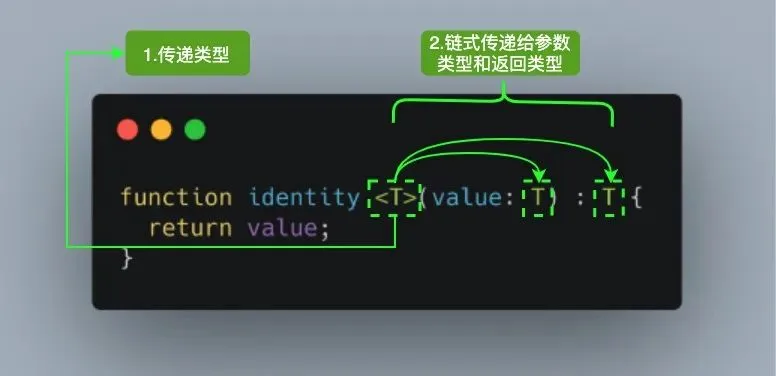
当我们调用 identity<Number>(1) ,Number 类型就像参数 1 一样,它将在出现 T 的任何位置填充该类型。图中 <T> 内部的 T 被称为类型变量,它是我们希望传递给 identity 函数的类型占位符,同时它被分配给 value 参数用来代替它的类型:此时 T 充当的是类型,而不是特定的 Number 类型。
其中 T 代表 Type,在定义泛型时通常用作第一个类型变量名称。但实际上 T 可以用任何有效名称代替。除了 T 之外,以下是常见泛型变量代表的意思:
- K(Key):表示对象中的键类型;
- V(Value):表示对象中的值类型;
- E(Element):表示元素类型。
其实并不是只能定义一个类型变量,我们可以引入希望定义的任何数量的类型变量。比如我们引入一个新的类型变量 U,用于扩展我们定义的 identity 函数:
function identity<T, U>(value: T, message: U): T {
  console.log(message);
  return value;
}

console.log(identity<number, string>(68, "Semlinker"));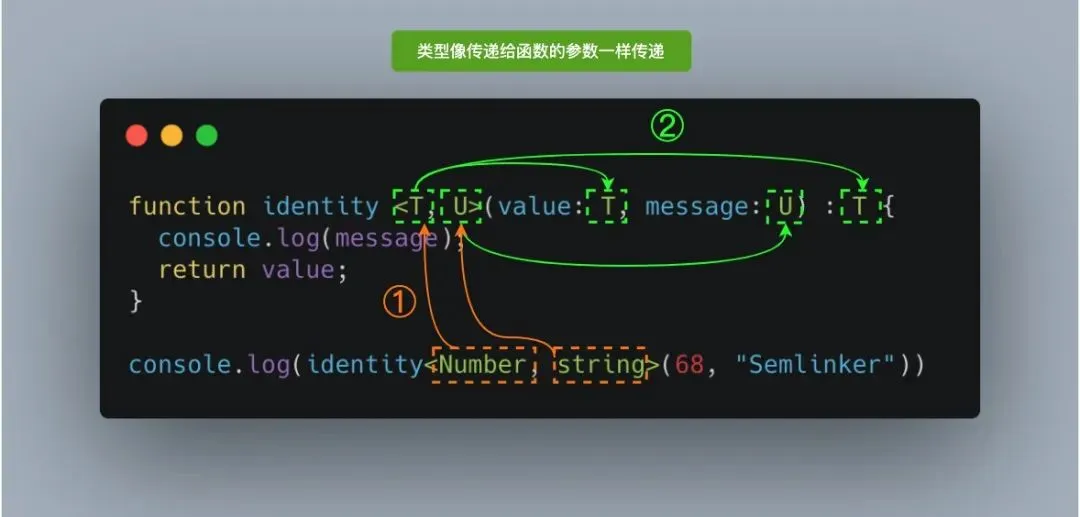
除了为类型变量显式设定值之外,一种更常见的做法是使编译器自动选择这些类型,从而使代码更简洁。我们可以完全省略尖括号,比如:
function identity<T, U>(value: T, message: U): T {
  console.log(message);
  return value;
}

console.log(identity(68, "Semlinker"));
五、关于 TS 工具库推荐
一、TypeScript Playground
简介:TypeScript 官方提供的在线 TypeScript 运行环境,利用它你可以方便地学习 TypeScript 相关知识与不同版本的功能特性。
二、TypeScript UML Playground
简介:一款在线 TypeScript UML 工具,利用它你可以为指定的 TypeScript 代码生成 UML 类图。
三、JSON TO TS
简介:一款 TypeScript 在线工具,利用它你可以为指定的 JSON 数据生成对应的 TypeScript 接口定义。
除了使用 jsontots 在线工具之外,对于使用 VSCode IDE 的小伙们还可以安装 JSON to TS 扩展来快速完成 JSON to TS 的转换工作。
四、Schemats
简介:利用 Schemats,你可以基于(Postgres,MySQL)SQL 数据库中的 schema 自动生成 TypeScript 接口定义。
五、TypeScript AST Viewer
简介:一款 TypeScript AST 在线工具,利用它你可以查看指定 TypeScript 代码对应的 AST(Abstract Syntax Tree)抽象语法树。
对于了解过 AST 的小伙伴来说,对 astexplorer 这款在线工具应该不会陌生。该工具除了支持 javascript 之外,还支持 CSS、JSON、RegExp、GraphQL 和 Markdown 等格式的解析。
六、TypeDoc
简介:TypeDoc 用于将 TypeScript 源代码中的注释转换为 HTML 文档或 JSON 模型。它可灵活扩展,并支持多种配置。
七、TypeScript ESLint
简介:使用 TypeScript ESLint 可以帮助我们规范代码质量,提高团队开发效率。
对 TypeScript ESLint 项目感兴趣且想在项目中应用的小伙伴,可以参考 “在 Typescript 项目中,如何优雅的使用 ESLint 和 Prettier” 这篇文章。
八、Deno
简介:Deno 是一个 javascript/TypeScript 的运行时,默认使用安全环境执行代码,有着卓越的开发体验。